Tree Branch with Swing: A Versatile Illustration Asset for Designers and Creative Professionals
Every visual project starts with a search for the right element. Sometimes you need a specific mood, a nostalgic touch, or a nature-inspired focal point that feels both simple and evocative. The Tree Branch with Swing illustration fits exactly into that space. It is not just a decorative graphic. It is a carefully constructed vector asset that can anchor a composition, support a brand message, or add emotional depth to a layout. Whether you are designing a book cover, building an app interface, or preparing marketing collateral, having access to a well-made illustration like this changes how efficiently you work.
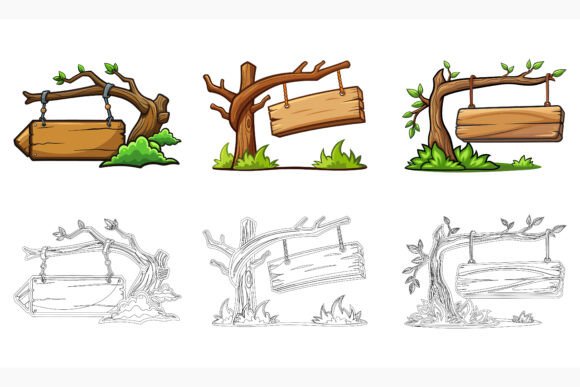
What sets this particular asset apart is the thoughtfulness behind its production. The file package includes three distinct variations of the swinging branch motif, giving you immediate flexibility without needing to create alternates from scratch. Each version is delivered in industry-standard formats: AI, EPS, and JPG. This multi-format approach means you do not waste time converting files or worrying about compatibility issues when moving between different software environments. The illustration is built to work on both Mac and Windows systems, which removes a common friction point for teams that operate across platforms.
Where the Tree Branch with Swing Fits into a Design Workflow
Understanding where an asset belongs in your broader creative process helps you make smarter decisions about when and how to use it. The Tree Branch with Swing illustration can enter your workflow at multiple stages. During the concept and mood boarding phase, it can serve as a reference point for a natural, serene, or whimsical aesthetic. In the layout and composition stage, it becomes a functional design element that you can scale, recolor, and position with precision because it is built as a vector graphic.
In a typical brand identity project, you might use the swing illustration as a secondary visual motif that supports the primary logo. For editorial design, it could appear as a chapter opener or a spot illustration that breaks up text-heavy pages. In digital product design, the asset can be integrated into onboarding screens, empty states, or background illustrations that humanize the interface. The key is that the file structure supports all of these scenarios. The neatly organized layers make it easy to isolate elements, adjust compositions, or extract specific parts of the illustration for reuse in other contexts.
How the Three Variations Expand Your Creative Options
One of the most practical features of this illustration set is the inclusion of three variations. Having multiple versions of the same core concept saves you from the tedious work of manually creating alternates. This is especially valuable when you are working under tight deadlines or managing multiple deliverables within a single campaign. You can use one variation for a hero image, another for a thumbnail or icon, and a third for a background texture or pattern. The variations might differ in composition, detail level, or stylistic treatment, giving you room to experiment without starting over.
For a small business owner preparing seasonal promotional materials, this means you can maintain visual consistency across social media posts, email headers, and print flyers while still offering subtle variety. For a blogger or content creator, the different versions can be used to create a recognizable visual signature that evolves slightly from post to post. The ability to edit colors and modify shapes easily means that even within a single variation, you have enormous creative control.
Integrating the Illustration with Other Tools and Platforms
The Tree Branch with Swing illustration does not exist in isolation. It is designed to work alongside the other tools, resources, and platforms you already use. Because the source files are provided in AI and EPS formats, you can open the illustration in Adobe Illustrator, Affinity Designer, CorelDRAW, or any vector-editing application that supports these standards. This compatibility ensures that you can incorporate the asset into your existing toolchain without disruption.
The JPG format adds another layer of convenience. When you need a quick raster version for a presentation slide, a website mockup, or a social media graphic, you can use the JPG file directly without launching a vector editor. This dual-format delivery respects the reality of modern creative work, where speed and flexibility often matter as much as precision. For teams that use project management platforms like Asana, Trello, or Notion, the organized file structure of this illustration set aligns well with asset management best practices. You can store, tag, and retrieve the files efficiently because they arrive in a clean, logical folder system.
Practical Considerations for Print and Digital Use
Few things are more frustrating than discovering that an illustration you bought for a print project cannot scale properly because it was built at a fixed resolution. Vector files eliminate that problem entirely. The AI and EPS formats included with the Tree Branch with Swing set are resolution-independent, which means you can enlarge the illustration to billboard size or reduce it to fit on a business card without losing quality. This is a critical advantage for professionals who work across both print and digital media.
Color editing is another area where the vector format proves its worth. You can change the branch color to match a seasonal palette, adjust the rope tone to fit a brand's visual identity, or modify the background elements to suit a specific composition. The organized layer structure makes this process straightforward. Instead of hunting through dozens of unnamed layers, you can quickly locate the element you want to edit and make your changes. For infographics and app symbols, where consistency and precision are non-negotiable, this level of control is invaluable.
Quality Control and Consistency in Asset Selection
Establishing quality standards for the assets you use is part of maintaining a professional output. The Tree Branch with Swing illustration reflects a commitment to detail that becomes apparent the moment you zoom in. Lines are clean, curves are smooth, and proportions feel natural. This attention to detail matters because low-quality assets can undermine an otherwise polished design. When you place an illustration next to custom typography or high-resolution photography, any inconsistency in quality becomes immediately visible.
Consistency across projects is another factor that professionals weigh carefully. If you build a visual library using assets from different sources, stylistic mismatches can accumulate over time. The Tree Branch with Swing set works as part of a larger collection of AI EPS illustrations, which means you can source additional assets from the same provider and maintain a cohesive visual language. This is particularly useful for agencies, publishers, and marketing teams that produce high volumes of content and need reliable, repeatable quality.
Using the Asset for Learning, Teaching, and Skill Development
Beyond direct commercial application, this illustration can serve as a learning tool. For educators teaching vector illustration techniques, the organized file provides a clear example of professional file structuring, layer naming conventions, and clean path construction. Students can open the AI file and study how the illustrator achieved clean curves, balanced compositions, and scalable details. They can also practice their editing skills by changing colors, rearranging components, or using parts of the illustration in their own composite designs.
For self-taught designers and hobbyists, working with well-structured source files accelerates the learning curve. You can reverse-engineer techniques, experiment with modifications, and build confidence in your ability to manipulate vector graphics. This dual role—as both a production-ready asset and an educational resource—adds long-term value that extends beyond a single project deadline.
Efficiency Gains Through Smart Organization
The time you save by using a neatly organized asset compounds across multiple projects. When every layer is properly named and every element is grouped logically, you spend less time deciphering the file and more time executing your creative vision. This organizational discipline is especially important in collaborative environments where multiple designers might access the same files. A clean file structure reduces miscommunication and prevents errors that occur when someone misinterprets an unclear layer grouping.
For freelancers and solopreneurs, efficiency directly impacts earning potential. If you can complete a client project faster by using well-organized, editable illustrations, you free up time for additional work or personal development. The Tree Branch with Swing set supports this by arriving ready to use, with minimal cleanup required. You can drag the asset into your working file, make a few adjustments, and see it integrate smoothly with your existing design elements.
Adapting the Illustration to Different Contexts and Needs
One of the most powerful aspects of an editable vector illustration is its adaptability. The same Tree Branch with Swing graphic that works for a children's book can be recolored and restyled for a wellness brand's website. The branch and swing motif carries universal associations with childhood, tranquility, nature, and simplicity—associations that translate across industries and audiences.
You might use the illustration as part of a logo concept for an outdoor retreat, incorporate it into packaging design for an organic product line, or place it in a presentation deck about work-life balance. The ability to change colors and modify shapes means you are not locked into the original aesthetic. You can simplify the illustration for use as a minimalist icon, add texture for a hand-drawn feel, or combine it with typography to create a custom social media template. This adaptability ensures that the asset remains useful long after your initial project concludes.
Making the Decision to Purchase and Start Using the Asset
When evaluating whether to buy a design asset, experienced professionals look at more than just the preview image. They consider file formats, editing flexibility, organizational quality, and how the asset will hold up across different use cases. The Tree Branch with Swing illustration set addresses these considerations directly. It arrives in three variations, in formats that suit both vector editing and quick raster placement. It is built for both Mac and Windows environments, eliminating platform-related surprises. The file and layer structure reflects professional standards, and the illustration itself demonstrates careful attention to detail and consistency.
Once you purchase the set, integration into your workflow is straightforward. Import the AI or EPS file into your preferred vector editor, explore the layers to understand how elements are grouped, and begin experimenting with color adjustments and compositional changes. Use the JPG files for rapid prototyping or when working in applications that do not support vector formats natively. Store the files in your asset library with clear naming conventions so you can retrieve them quickly for future projects. Over time, you will find that having a reliable, adaptable illustration like this in your toolkit reduces the friction of starting new creative work.
Long-Term Value and Reusability
An illustration set that you use once has limited value. An illustration set that you can return to repeatedly, adapting it for different purposes and contexts, becomes a genuine asset. The Tree Branch with Swing files are built for reuse. Because you can edit colors, shapes, and compositions, the same base illustration can serve dozens of distinct projects without feeling repetitive. A publisher might use one variation for a spring catalog cover and another for an autumn newsletter header, changing the color palette to match the season. A marketer might use the swing motif in a series of email campaigns, subtly altering the illustration each time to maintain subscriber interest.
This reusability also supports a more sustainable approach to design. Rather than purchasing a new illustration for every project, you build a curated library of versatile, editable assets that you can combine and adapt over the long term. The Tree Branch with Swing set fits naturally into such a library, complementing other nature-themed, narrative, or lifestyle illustrations you may already own or plan to acquire.