Ginger Cartoon Cat: Playful Vector Art for Your Projects
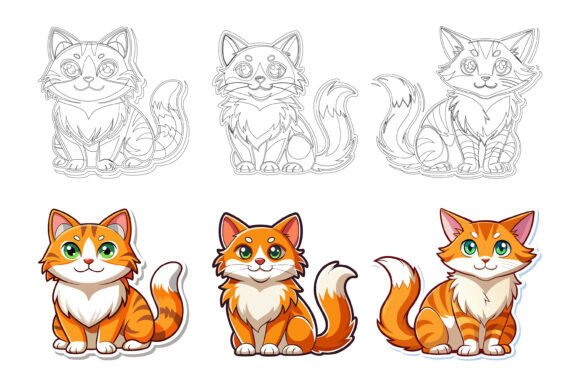
You know that moment when a visual element instantly changes the entire energy of your design? That’s exactly what happens when you introduce a character like this one. Our special AI EPS collection centers on a Ginger Cartoon Cat that manages to be both expressive and endlessly versatile. It’s not just a cat illustration; it’s a flexible storytelling tool with a warm, welcoming presence. The set comes bundled with a friendly “Hello Welcome” typographic treatment that expands its usability across dozens of real‑world applications. Whether you’re refining a brand identity, building social media graphics, or laying out an editorial spread, this cat adds instant personality without ever feeling childish or overused.
What makes this asset immediately usable is its thoughtful construction. The file package includes native AI and EPS files — perfect for Mac and Windows users who need pixel‑perfect vectors — along with a high‑quality JPG preview. But the real value lies under the hood. Every object sits on its own clearly labeled layer, making it easy to isolate, recolor, or adjust individual parts of the illustration. The fur texture, ear shapes, tail curve, and even the letterforms in “Hello Welcome” are separated logically. You don’t waste time ungrouping messy paths. That kind of organization matters deeply when you’re juggling deadlines and client revisions.
What Makes This Ginger Cartoon Cat Stand Out
Visually, the character avoids harsh outlines and rigid geometry. The ginger coat uses a warm, toasted orange palette with subtle cream accents on the muzzle and paws — a combination that feels friendly without being saccharine. The eyes are large and rounded, with a gentle highlight that conveys curiosity and approachability. One ear is slightly tilted, and the tail curves into a relaxed, almost quizzical arc. It’s the kind of expression that works equally well for a vet clinic brochure, a children’s app onboarding screen, or a lifestyle blog’s newsletter header.
The “Hello Welcome” text element is not an afterthought. It’s hand‑drawn in a casual, slightly rounded lettering style that harmonizes with the cat’s organic lines. You can use the two together as a complete greeting graphic, or you can separate them: the cat becomes a mascot, and the text becomes a standalone call‑to‑action. Because everything is fully vector, scaling from a tiny app icon to a large window decal keeps edges crisp and colors consistent. No blurred edges, no awkward pixelation.
Where These Illustrations Shine Brightest
Asset versatility often separates a one‑use download from a resource you reach for repeatedly. This Ginger Cartoon Cat set spans that gap comfortably. Here are some practical contexts where it consistently delivers.
- Brand identity systems: Use the cat as a secondary logo mark or a recurring motif across stationery, loyalty cards, and website footers. Its warm expression softens corporate stiffness without undermining professionalism.
- Editorial and print design: Think magazine sidebars, recipe card headers, children’s book interior spots, or event invitations. The JPG reference file lets you quickly mock up layouts before committing to high‑resolution vector export.
- Social media graphics: The cat and “Hello Welcome” text work perfectly for Instagram story templates, Facebook cover images, or Pinterest pins. Because colors are editable, you can match the cat’s fur tone to your campaign palette in seconds.
- Web and app UI elements: A friendly mascot can boost user engagement. Place the cat on a 404 page, a loading screen, or an onboarding flow. The organized layers let you swap the tail position or adjust gaze direction to suit different interactions.
- Infographics and presentation decks: A character that explains statistics or guides viewers through a process reduces cognitive load. The cat can point, react, or simply sit next to data points, adding emotional context to numbers.
- Physical merchandise: T‑shirts, tote bags, mugs, and sticker packs. The clean vectors and consistent line weights make the artwork ready for screen printing, vinyl cutting, or embroidery digitizing.
How This Set Elevates Your Creative Workflows
We often talk about design consistency as a series of technical rules — same margins, same type scale — but visual tone matters just as much. A well‑crafted illustration like this Ginger Cartoon Cat becomes a thread that ties disparate pieces together. When you use the cat across a website header, an email newsletter, and a printed thank‑you card, you create a subtle emotional continuity. Audiences recognize the character and associate it with the warmth and reliability you’ve already established.
From a brand strategist’s perspective, the cat also helps define a personality. A financial app might use the cat to appear more approachable; a pet‑sitting service uses it to reinforce expertise in animal care. Because the smile is gentle rather than goofy, the asset never undermines serious messaging. It adds levity without becoming a caricature. This balance is surprisingly hard to find in stock illustrations, where extremes of cuteness or corporate blandness dominate.
Editing Without Headaches
User‑friendly customization is one of the strongest arguments for this collection. Open the AI or EPS file in Adobe Illustrator, Affinity Designer, CorelDRAW, or even free alternatives like Inkscape, and you’ll find a clean layer stack. It usually looks something like this:
- Background (optional, easily hidden)
- Cat body base
- Stripes and fur details
- Facial features and highlights
- Tail
- “Hello Welcome” text group
- Shadows and accents
This organization means you can click once to change the cat’s main coat color from ginger to a cooler gray for a modern brand, or adjust the text to say something completely custom without touching the character artwork. You can also scale individual elements — maybe you want the tail to extend farther, or you need a larger space to insert your own typography. Everything remains editable, so no re‑tracing or redrawing is necessary.
Practical Pairings and Design Decisions
An illustration set never works in isolation. Thoughtful pairing with typography and layout amplifies its impact. When I place this Ginger Cartoon Cat next to a clean sans serif like Inter or Figtree, the overall feel stays modern and friendly — ideal for tech startups and lifestyle apps. If I combine it with a slightly rounded serif, the tone shifts toward publishing and educational materials. The “Hello Welcome” lettering itself has a playful weight that pairs nicely with simple geometric shapes and soft pastel backgrounds.
Before committing to a final composition, I recommend testing the illustration at multiple sizes. Because the eyes are relatively large and the line thickness is consistent, the cat remains recognizable even at 32 pixels across — crucial for favicons or app‑store badges. At large scale, the vector quality reveals subtle details: whisker curves, the slight gradient in the eyes, and the organic contour of the tail. These details contribute to a perception of quality that clients and customers absolutely notice, even if they can’t articulate why.
Addressing Common Concerns About Editable Assets
Many designers hesitate with editable illustrations because they fear losing time to cleanup. In this set, the layer naming is descriptive rather than generic (“Layer 1 copy 3”) — that’s a deliberate design choice that cuts down frustration. Another worry is file compatibility. The AI EPS format, saved with standard compatibility, opens smoothly across platforms. Mac and Windows users will experience the same organized structure. If you primarily work in Canva or Figma, you can import the high‑resolution JPG for quick layouts, then switch to the vector file for final production.
From a licensing standpoint, commercial use is permitted, so you can confidently incorporate the cat into client work, sellable merchandise, or promotional materials. Always check the included license for any attribution requirements or distribution limits, but typical terms allow broad usage. This is especially relevant for agencies managing multiple brand accounts; you don’t want to second‑guess asset rights during a pitch.
Real‑World Examples Worth Stealing
To make this more concrete, imagine a local cat café rebranding. They need a memorable mark, menu headers, and social media templates. The ginger cat becomes the café’s mascot, appearing on the storefront sign with the “Hello Welcome” text above the door. The menu uses a smaller version next to each section title. Instagram stories feature the cat holding a coffee cup (easily composited since the base illustration is editable). The entire identity feels cohesive and lovingly crafted in a single weekend.
Or consider a freelance educator building an online course about creative thinking. Each module begins with a slide where the cat appears next to a warm greeting. The familiarity reduces learner anxiety and creates a friendly learning environment. When the course promotes a workbook, the cat appears on the cover and inside as a margin doodle. The vector format ensures the printed workbook looks as crisp as the digital slides, with no resolution surprises.
Another scenario: a tech startup wants to send out error‑page illustrations that don’t feel punishing. A customized version of the ginger cat, perhaps with a slightly tilted head and a tiny thought bubble, turns a frustrating moment into a small delight. The startup can even animate the illustration later using the same base vectors, because each part is isolated and ready for motion graphics work.
Getting Started and Making It Your Own
Once you download the files, spend ten minutes exploring the layer structure before you start dragging elements into a final layout. Hide and unhide layers to understand what’s editable. Experiment with the global swatches if they’re set up — you might be able to shift the entire color scheme with a single tweak. Test the illustration on dark backgrounds, busy photo backdrops, and solid color fields to see how the shapes hold up. The consistent line weight and simple shading make it read well across contrasting contexts.
If you need to replace “Hello Welcome” with your own brand tagline, type your text in a similar casual handwriting font or create your own lettering using the existing text as a guide. Because the layer includes only outlines, you can delete it entirely without disturbing the cat. Conversely, if you only need the text, hide the cat layer and export the welcome message as a standalone PNG or SVG. This modularity means you get several assets in one, expanding the value beyond a single static graphic.
For those working with print‑on‑demand products, export the cat as a high‑resolution PNG with a transparent background and upload it directly to your store. The ginger color prints beautifully on light‑colored apparel and darker backgrounds alike, though you may want to lighten the outlines slightly for heathered fabrics. Because the vector source is clean, any adjustments remain lossless.
Every creative professional has those go‑to resources that save a project when time is tight or inspiration feels low. This Ginger Cartoon Cat collection earns a spot in that toolkit. It’s detailed enough to impress, simple enough to modify quickly, and structured in a way that respects your workflow. The “Hello Welcome” addition only broadens its usefulness. Whether you’re building a brand identity, designing social media graphics, or crafting editorial layouts, you’ll find yourself reaching for this cat again and again. So what are you waiting for? Buy now and start using this awesome illustration.